Showing posts with label category. Show all posts

Friday, November 27, 2009

Nesting categories

A recurring topic around categorization in p2 is the ability to nest categories.


Like for the categorization of bundles, the trick consists in using the eclipse feature editor to express the dependencies and thus construct the desired nesting.

Steps:
First phase, creation of the inner category.
  1. Create a feature project called InnerCategory1. In our example this will be the feature containing the elements to be shown categorized.
  2. Turn this feature into a category by creating a p2.inf and filling it with:
    properties.1.name=org.eclipse.equinox.p2.type.category
    properties.1.value=true
  3. Remove everything from the build.properties of the feature.
  4. Use the features and plug-ins tab of the feature editor to add content to be categorized.
This concludes the creation of the inner category. The following steps create the "top level" category.
  1. Create a feature project called TopLevelCategory
  2. Turn this feature into a category creating a p2.inf and filling it with:
    properties.1.name=org.eclipse.equinox.p2.type.category
    properties.1.value=true
  3. Remove everything from the build.properties of the feature.
  4. In the features tab of the editor, add InnerCategory1
  5. Export the top level feature enabling metadata generation
You can find the code of this example on the wiki.
Happy categorization, happy provisioning!

Categorizing plug-ins

Despite what is commonly believed and what I have repeated to several occasions, p2 does allow for the installation of anything, anything being for example just bundles. It just happens that today, with the practices adopted over the years, features have grown to be the primary way of delivering features.
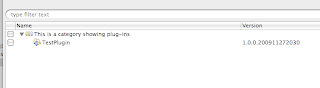
I'm now showing how to create a p2 repository whose category refers to bundles.
Steps:
  1. Create a new feature project. This adds the category property to the installable unit, thus allowing the UI to recognize the feature as a category to be displayed.
  2. Create a file named p2.inf in the feature project and paste in the following two lines:
    properties.1.name=org.eclipse.equinox.p2.type.category
    properties.1.value=true

  3. Include the plug-ins you want to see being categorized. This is where you define what goes in the category. Each entry in the plug-ins list will be shown under the category.

  4. Remove everything from the build.properties included in the feature. This causes PDE to not generate a feature.jar.
  5. Export the feature enabling metadata generation.

You can find a zip of this example on the wiki.
Happy categorization, happy provisioning!